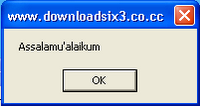
Message box,, pasti dah tau apa itu message box..ya kayak gambar di samping itu tuh..Ok disini saya akan ngasih sedikit tutor tentang buat Fake Message Box ( Kotak pesan palsu) sesuai keinginanmu,, ini bukan trik yang sulit kok..hanya perlu sedikit kode script n kreatifitas doang. Ok gak perlu basa-basi lagi langsung aja cekidot…
Ok,, pertama yang anda butuhkan adalah sebuah notepad. Ok notepad terbuka ketik code berikut
x=msgbox("pesan mu",16+6,"Judul message box mu")
ok,, ganti tulisan yang berwarna merah dengan tulisan yang anda ingin munculkan. Lalu save dengan nama sesuka anda terserah tapi jangan lupa formatnya adalah *vbs..misal “iseng.vbs”. Dan ini adalah tampilan dari kode diatas
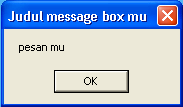
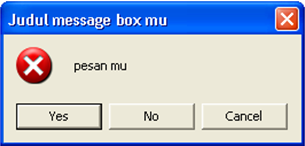
Gimana?? Simple kan…dan kode “16+6” ditas dapat anda ganti menjadi misal 16+2 ato 16+4 nanti anda akan temukan hasil yang sedkit berbeda misal kode “16+6” diatas kita ganti dengan kode “16+3” dan kodenya menjadi
x=msgbox("pesan mu",16+3,"Judul message box mu")
dan tampilan message box nya akan menjadi
Ok,, anda bisa bereksperimen sendiri sesuai kreatifitas anda,, lalu apa gunanya sekedar message box za..ehm,, mungkin anda bisa menggunakan message box anda sendiri untuk memberi salam saat sedang baru logon computer..n itu mudah kok,, tinggal taruh aja file “iseng.vbs” tadi di startup windows. Atau mungkin anda bisa buat sekedar iseng nih menggunakan pesan ini..dah saya bilang kan itu tergantung kreatifitas anda..disini saya hanya ngasih sedkit tutor sederhana. Oh ya..ok sekian dulu tutor kali ini..hehehe
SUMBER:WWW.TERGELINCIR.BLOGSPOT.COM
Saat kita akan mengedit registri, ada kalanya fungsi regedit di Windows tidak bisa diakses alias disable. Ini bisa dikarenakan oleh virus, atau juga memang oleh sang Administrator telah di-disable untuk mencegah orang yang tidak berkepentingan mengutak-atik setting Windows. Kalau anda pernah mengalami kejadian seperti ini Registry Editing has been disable by your Administrator ketika memasukkan perintah REGEDIT pada menu RUN
Inilah solusi singkat yang mungkin bisa membantu anda mengatasi masalah seperti diatas.
Klik Menu [Start] – [RUN] dan masukkan perintah : GPEdit.msc
Akan muncul Windows Group Policy, selanjutnya arahkan ke [User Configuration] – [Administrative Templates] – [System].
Setelah itu pada jendela sebelah kanan (panel setting) Double Klik Prevent Access to Registry Editing Tools
Pada jendela yang muncul pilih NOT CONFIGURED atau DISABLED, untuk mengaktifkan kembali fungsi regedit.
Klik OK
Sekarang coba anda akses registry editor lewat menu [RUN] - REGEDIT kalau masih belum berhasil, Restart Komputer anda dan coba akses lagi registry editor.
Bila ternyata Solusi tersebut masih juga kurang ampuh, Tinggal Download REGTOOLS dari Doug Knox, Save dan kemudian jalankan regtools, ini berfungsi untuk meng-enable dan disable registry. Bila kondisi registry editor disable, maka regtool akan meng-enable-kannya, begitupun sebaliknya.
Selamat mencoba dan jangan lupa untuk mendapatkan update dan informasi terbaru dari tasikisme.com secara langsung ke email, tinggal masukkan email anda di bawah ini dan klik subscribe!
Bagi rekan-rekan yang suka nonton video di YouTube tapi masih bingung ingin mendownloadnya, atau yang bisa download tapi bingung mencari player file tersebut. Berikut ini tips-tips yang sangat mudah dan semoga bermanfaat bagi Anda yang membutuhkan.
Langkah-langkah yang perlu dilakukan:
1. Buka website YouTube - cari dan pilih video yang ingin dilihat - copy link video


2. Buka website yang menyediakan layanan untuk mendownload
SaveTube- paste link video dari YouTube - enter/Go


3. Lihat halaman website SaveTube cari link/tulisan download - klik dan save ke komputer Anda - beri nama dengan contoh format nama:
namafile.flv (jangan lupa
namafile ditambahkan ekstensi
.flv)


4. Untuk memainkan file FLV tersebut Anda bisa menggunakan program
FLV Player - download dan install di komputer Anda. Setelah terinstal Anda dapat memainkan file FLV yang telah didownload.

5. Tips terakhir merupakan tambahan jika Anda mendownload video lagu/musik dan ingin merubah file FLV ke format MP3 agar dapat disimpan dan dimainkan di Winamp, Windows Media Player, HP, IPod dan lainnya silahkan menggunakan program
FLV 2 MP3.
Jika ingin mengutip/copy-paste harap lampirkan
sumbernya. Terima kasih.
Selamat mencoba.
buka microsoft word, dan ketik:
=rand (200,99)
lalu tekan ENTER !!
hasilnya microsoft word akan membuat:
The quick brown fox jumps over the lazy dog. The quick brown fox jumps over the lazy dog. The quick brown fox jumps over the lazy dog. The quick brown fox jumps over the lazy dog. The quick brown fox jumps over the lazy dog. The quick brown fox jumps over the lazy dog. The quick brown fox jumps over the lazy dog. The quick brown fox jumps over the lazy dog. The quick brown fox jumps over the lazy dog. The quick brown fox jumps over the lazy dog. The quick brown fox jumps over the lazy dog. The quick brown fox jumps over the lazy dog. The quick brown fox jumps over the lazy dog. The quick brown fox jumps over the lazy dog. The quick brown fox jumps over the lazy dog. The quick brown fox jumps over the lazy dog. The quick brown fox jumps over the lazy dog. The quick brown fox jumps over the lazy dog. The quick brown fox jumps over the lazy dog. The quick brown fox jumps over the lazy dog. The quick brown fox jumps over the lazy dog. The quick brown fox jumps over the lazy dog. The quick brown fox jumps over the lazy dog. The quick brown fox jumps over the lazy dog. The quick brown fox jumps over the lazy dog. The quick brown fox jumps over the lazy dog. The quick brown fox jumps over the lazy dog. The quick brown fox jumps over the lazy dog. The quick brown fox jumps over the lazy dog. The quick brown fox jumps over the lazy dog. The quick brown fox jumps over the lazy dog. The quick brown fox jumps over the lazy dog. The quick brown fox jumps over the lazy dog. The quick brown fox jumps over the lazy dog. The quick brown fox jumps over the lazy dog. The quick brown fox jumps over the lazy dog. The quick brown fox jumps over the lazy dog. The quick brown fox jumps over the lazy dog. The quick brown fox jumps over the lazy dog. The quick brown fox jumps over the lazy dog. The quick brown fox jumps over the lazy dog. The quick brown fox jumps over the lazy dog. The quick brown fox jumps over the lazy dog. The quick brown fox jumps over the lazy dog. The quick brown fox jumps over the lazy dog. The quick brown fox jumps over the lazy dog. The quick brown fox jumps over the lazy dog. The quick brown fox jumps over the lazy dog. The quick brown fox jumps over the lazy dog. The quick brown fox jumps over the lazy dog. The quick brown fox jumps over the lazy dog. The quick brown fox jumps over the lazy dog. The quick brown fox jumps over the lazy dog. The quick brown fox jumps over the lazy dog. The quick brown fox jumps over the lazy dog. The quick brown fox jumps over the lazy dog. The quick brown fox jumps over the lazy dog. The quick brown fox jumps over the lazy dog. The quick brown fox jumps over the lazy dog. The quick brown fox jumps over the lazy dog. The quick brown fox jumps over the lazy dog. The quick brown fox jumps over the lazy dog. The quick brown fox jumps over the lazy dog. The quick brown fox jumps over the lazy dog. The quick brown fox jumps over the lazy dog. The quick brown fox jumps over the lazy dog. The quick brown fox jumps over the lazy dog. The quick brown fox jumps over the lazy dog. The quick brown fox jumps over the lazy dog. The quick brown fox jumps over the lazy dog. The quick brown fox jumps over the lazy dog. The quick brown fox jumps over the lazy dog. The quick brown fox jumps over the lazy dog. The quick brown fox jumps over the lazy dog. The quick brown fox jumps over the lazy dog. The quick brown fox jumps over the lazy dog. The quick brown fox jumps over the lazy dog. The quick brown fox jumps over the lazy dog. The quick brown fox jumps over the lazy dog. The quick brown fox jumps over the lazy dog. The quick brown fox jumps over the lazy dog. The quick brown fox jumps over the lazy dog. The quick brown fox jumps over the lazy dog. The quick brown fox jumps over the lazy dog. The quick brown fox jumps over the lazy dog. The quick brown fox jumps over the lazy dog.
sampai dengan halaman 235.
cocok buat ngerjain orang yang komputernya lambat, pasti hang :P

cursor: url("http://i137.photobucket.com/albums/q210/kyawsawdin/FireRed.gif"), default;